Every shortcut
One key
Hold ⌘ Command and see all keyboard shortcuts of the current app. Release to dismiss.
macOS 13.0+ · Free · How to open unsigned apps · Setup guide
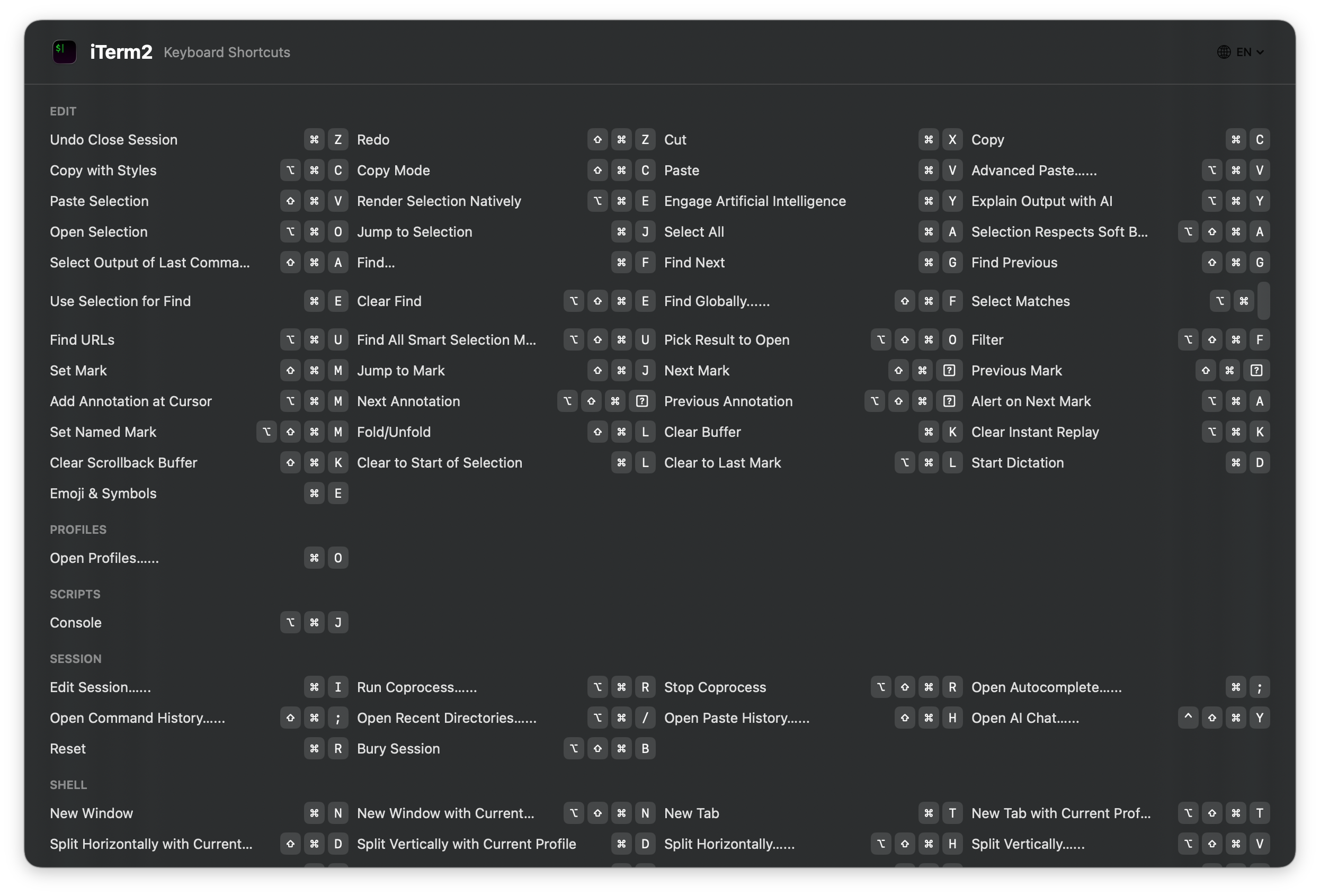
No more googling shortcuts
Every shortcut of the current app, right in front of you. Hold Command and done.
Works out of the box
Reads shortcuts from the app's menu bar automatically. Zero setup, zero config.
Barely there
A tiny native app that lives in your menu bar. No slowdowns, no distractions.
Free, forever
No ads, no subscriptions, completely free.
Requires macOS 13.0 (Ventura) or later. Accessibility permission needed.
First-time Setup
Temporary steps required until the app is signed with an Apple Developer certificate.
- Open Terminal and run:
sudo xattr -rd com.apple.quarantine /Applications/KeyHint.app codesign --force --deep --sign - /Applications/KeyHint.app - Grant Accessibility permission: System Settings → Privacy & Security → Accessibility → click + → select KeyHint.app
- Done! Hold ⌘ to see shortcuts.